Diferencia entre revisiones de «Midnight Nowhere»
De AbandonWiki
Ir a la navegaciónIr a la búsquedam (Texto reemplazado: «16px|link=La Aventura es la Aventura|LAELA» por «16px|link=LAELA») |
m (Texto reemplazado: «] * [[Archivo:» por «] [[Archivo:») |
||
| Línea 89: | Línea 89: | ||
| | | | ||
[[Archivo:AbandonSocios.ico.png|16px|link=AbandonSocios]] [https://www.abandonsocios.org/index.php?topic=12170 AbandonSocios] | [[Archivo:AbandonSocios.ico.png|16px|link=AbandonSocios]] [https://www.abandonsocios.org/index.php?topic=12170 AbandonSocios] | ||
| − | + | [[Archivo:Buka_Entertainment.ico.png|16px|Buka Entertainment]] [http://www.buka.ru/cgi-bin/show.pl?id=132 Buka Entertainment] | |
| − | + | [[Archivo:Dardo.ico.png|16px|link=Las Aventuras de Dardo|Las Aventuras de D@®Do]] [https://dardoaventuras.com/aventura/Eresmas/nowhe.html Guía, por D@®Do] | |
| − | + | [[Archivo:Internet_Archive.ico.png|16px|link=Internet Archive]] [http://web.archive.org/web/*/http://www.saturnplus.ru/path/oazis_path1.exe oazis_path1.exe] | |
| − | + | [[Archivo:Buka_Entertainment.ico.png|16px|Buka Entertainment]] [http://www.buka.ru/cgi-bin/show.pl?option=Show_patch&id=132 blackoasis_patch_1.zip] | |
| − | + | [[Archivo:Aventura_y_Cia.ico.png|16px|link=Aventura y Cía]] [https://www.aventuraycia.com/juegos/midnight-nowhere Aventura y Cía] [https://www.aventuraycia.com/v3/preview.php?id=6 2] | |
| − | + | [[Archivo:LAELA.ico.png|16px|link=LAELA]] [https://la-aventura.eu/aventuras/midnight-nowhere LAELA] | |
| − | + | [[Archivo:Clan_DLAN.ico.png|16px|link=Clan DLAN]] [http://revisiones.clandlan.net/index.php?page=revisiones/view&review=4349 Clan DLAN] | |
| − | + | [[Archivo:A-for_Adventure.ico.png|16px|A-for Adventure]] [http://www.a-for-adventure.com/gamereview.php?id=333 A-for Adventure] | |
| − | + | [[Archivo:IGN.ico.png|16px|IGN]] [http://pc.ign.com/articles/499/499460p1.html IGN] | |
| − | + | [[Archivo:Adventure-Archiv.ico.png|16px|Adventure-Archiv]] [http://www.adventurearchiv.com/m/midnightreviewe.html Adventure-Archiv] | |
| − | + | [[Archivo:Just_Adventure_-_02.ico.png|16px|link=Just Adventure]] [https://web.archive.org/web/20090906113507/http://www.justadventure.com/reviews/MidnightNowhere/MidnightNowhere.shtm Just Adventure] | |
| − | + | [[Archivo:Adventure_Gamers.ico.png|16px|link=Adventure Gamers]] [https://adventuregamers.com/games/view/15578 Adventure Gamers] | |
| − | + | [[Archivo:GameBoomers.ico.png|16px|GameBoomers]] [https://www.gameboomers.com/reviews/Mm/Midnightnowherebygatorlaw.htm GameBoomers] | |
| − | + | [[Archivo:GameSpot.ico.png|16px|link=GameSpot]] [https://www.gamespot.com/reviews/midnight-nowhere-review/1900-6092743 GameSpot] | |
| − | + | [[Archivo:Metzomagic.ico.png|16px|Metzomagic]] [https://www.metzomagic.com/showArticle.php?index=622 Metzomagic] | |
| − | + | [[Archivo:GameSpy.ico.png|16px|GameSpy]] [http://uk.pc.gamespy.com/pc/midnight-nowhere/494374p1.html GameSpy] | |
| − | + | [[Archivo:Four_Fat_Chicks.ico.png|16px|Four Fat Chicks]] [http://www.tap-repeatedly.com/Reviews/Midnight_Nowhere/MN.shtml Four Fat Chicks] | |
| − | + | [[Archivo:MobyGames.ico.png|16px|link=MobyGames]] [https://www.mobygames.com/game/12880 MobyGames] | |
| − | + | [[Archivo:TheLegacy.ico.png|16px|link=TheLegacy]] [https://web.archive.org/web/20160603013220/http://www.thelegacy.de/Museum/15803 TheLegacy] | |
| − | + | [[Archivo:Adventure_Legends.ico.png|16px|link=Adventure Legends]] [https://www.legendsworld.net/adventure/game/4284 Adventure Legends] | |
| − | + | [[Archivo:Questzone.ico.png|16px|link=Questzone]] [https://questzone.ru/enzi/game/18 Questzone] | |
}} | }} | ||
{{Juegos}} | {{Juegos}} | ||
Revisión del 06:07 4 ene 2025


Descripción
"Midnight Nowhere" te sumergirá en un mundo lleno de ambiente y suspense, con una historia que se va desarrollando a medida que solucionas los acertijos y vences a las criaturas de la oscuridad, hasta llegar al misterio final. Prepárate para la experiencia más emocionante en un sobrecogedor y prodigioso mundo tridimensional de suspense y terror.
Personajes
Curiosidades
Instalación
Windows XP
- Para la instalación son necesarios los dos CDs. Para jugar se necesita tener insertado el CD2.--cireja 00:12 24 sep 2013
Windows 7 64bits
- Ejecutar la utilidad de configuración que se encuentra en la carpeta de instalación del juego. Para ello localizar el "config.exe", ejecutarlo y quitar la marca de verificación de las siguientes opciones:
- - Use hardware TnL
- - Enable music
- No hay necesidad de activar el modo de compatibilidad, no afectará el juego. De esta forma se podrá jugar, pero sin música. Estas instrucciones son también válidas para Windows Vista y 8.--cireja 18:39 22 ene 2014 (CET)
Imágenes


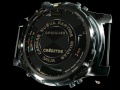
Midnight Nowhere
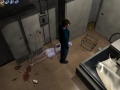
Midnight Nowhere
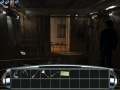
Midnight Nowhere
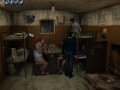
Midnight Nowhere
Midnight Nowhere


Extras
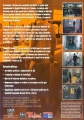
Trasera


