Diferencia entre revisiones de «Spellbound: A Clive Mandrake Adventure»
De AbandonWiki
Ir a la navegaciónIr a la búsqueda (Página creada con '{{Definir título|Spellbound: A Clive Mandrake Adventure|32x32px}} {{Ficha de juego |caratula = Spellbound...') |
m (Texto reemplazado: «16px|Kafka's Koffee» por «{{Kafka's Koffee}}») |
||
| (No se muestran 39 ediciones intermedias del mismo usuario) | |||
| Línea 1: | Línea 1: | ||
| − | {{Definir título|Spellbound: A Clive Mandrake Adventure|[[ | + | {{Definir título|Spellbound: A Clive Mandrake Adventure|[[Archivo:Spellbound_-_A_Clive_Mandrake_Adventure.ico.png|32px]]}} |
{{Ficha de juego | {{Ficha de juego | ||
|caratula = Spellbound_-_A_Clive_Mandrake_Adventure_-_01.jpg | |caratula = Spellbound_-_A_Clive_Mandrake_Adventure_-_01.jpg | ||
|genero1 = {{Aventura gráfica}} | |genero1 = {{Aventura gráfica}} | ||
|genero2 = {{Amateur}} | |genero2 = {{Amateur}} | ||
| − | | | + | |alias1 = |
| − | |año1 = | + | |año1 = {{Mundial}} 27 Nov 2003 |
| − | |tematica1 = {{ | + | |tematica1 = {{Investigación}} |
| − | |textos1 = | + | |textos1 = {{Inglés}} |
|voces1 = | |voces1 = | ||
|licencia1 = {{Gratis}} | |licencia1 = {{Gratis}} | ||
| Línea 14: | Línea 14: | ||
|distribuidor1 = | |distribuidor1 = | ||
|editor1 = | |editor1 = | ||
| − | |soporte1 = Descarga | + | |soporte1 = {{Descarga}} |
| − | |motor1 = | + | |motor1 = {{AGS|2.60}} |
| − | |motor2 = | + | |motor2 = {{Flash|Flash}} |
|perspectiva1 = 3ª persona | |perspectiva1 = 3ª persona | ||
|entorno1 = 2D | |entorno1 = 2D | ||
| − | |control1 = Ratón | + | |control1 = {{Ratón}} |
| − | |plataforma1 = | + | |plataforma1 = {{Windows}} |
|pegi = | |pegi = | ||
|pegi-lenguaje soez = | |pegi-lenguaje soez = | ||
| Línea 40: | Línea 40: | ||
====Windows XP==== | ====Windows XP==== | ||
* El inventario aparece moviendo el cursor al fondo de la pantalla. | * El inventario aparece moviendo el cursor al fondo de la pantalla. | ||
| − | :En la piedra superior derecha deberemos dibujar unos signos que vienen en un libro junto al juego en un fichero Flash. Se dibujan manteniendo pulsado el cursor hasta completar el dibujo del hechizo deseado. Si se ha hecho bien, el cursor se volverá rojo.--[[Usuario:Cireja|cireja]] 18:48 4 oct 2013 | + | :En la piedra superior derecha deberemos dibujar unos signos que vienen en un libro junto al juego en un fichero Flash. Se dibujan manteniendo pulsado el cursor hasta completar el dibujo del hechizo deseado. Si se ha hecho bien, el cursor se volverá rojo.--[[Usuario:Cireja|cireja]] 18:48 4 oct 2013 |
==Imágenes== | ==Imágenes== | ||
<gallery caption=""> | <gallery caption=""> | ||
| − | + | Archivo:Spellbound_-_A_Clive_Mandrake_Adventure_-_01.jpg|{{PAGENAME}} | |
| − | + | Archivo:Spellbound_-_A_Clive_Mandrake_Adventure_-_02.jpg|{{PAGENAME}} | |
| − | + | Archivo:Spellbound_-_A_Clive_Mandrake_Adventure_-_03.jpg|{{PAGENAME}} | |
| − | + | Archivo:Spellbound_-_A_Clive_Mandrake_Adventure_-_04.jpg|{{PAGENAME}} | |
| − | + | Archivo:Spellbound_-_A_Clive_Mandrake_Adventure_-_05.jpg|{{PAGENAME}} | |
| − | + | Archivo:Spellbound_-_A_Clive_Mandrake_Adventure_-_06.jpg|{{PAGENAME}} | |
| − | + | Archivo:Spellbound_-_A_Clive_Mandrake_Adventure_-_07.jpg|{{PAGENAME}} | |
| − | + | Archivo:Spellbound_-_A_Clive_Mandrake_Adventure_-_08.jpg|{{PAGENAME}} | |
</gallery> | </gallery> | ||
==Enlaces de interés== | ==Enlaces de interés== | ||
| − | + | {{Enlaces | |
| − | + | |url1 = {{Kafka's Koffee}} [http://www.kafkaskoffee.com/spellbound.shtml Kafka's Koffee] | |
| − | + | |url2 = {{Ultimate Game Solutions}} [https://gamesolutions.efzeven.nl/spellbound-a-clive-mandrake-adventure-walkthrough-eric-feurstein2003 Guía en inglés] | |
| − | + | |url3 = {{AGS}} [https://www.adventuregamestudio.co.uk/play/game/305 AGS] [https://www.adventuregamestudio.co.uk/forums/index.php?topic=9984 2] [https://www.adventuregamestudio.co.uk/forums/index.php?topic=9425.msg121378#msg121378 3] | |
| − | + | |url4 = {{Adventure Gamers}} [https://adventuregamers.com/games/view/15474 Adventure Gamers] | |
| + | |url5 = {{Internet Archive}} [https://archive.org/details/mags-spellbound Internet Archive] | ||
| + | }} | ||
{{Juegos}} | {{Juegos}} | ||
Revisión actual del 21:50 17 ago 2025


Descripción
Personajes
Curiosidades
Instalación
Windows XP
- El inventario aparece moviendo el cursor al fondo de la pantalla.
- En la piedra superior derecha deberemos dibujar unos signos que vienen en un libro junto al juego en un fichero Flash. Se dibujan manteniendo pulsado el cursor hasta completar el dibujo del hechizo deseado. Si se ha hecho bien, el cursor se volverá rojo.--cireja 18:48 4 oct 2013
Imágenes
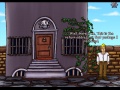
Spellbound: A Clive Mandrake Adventure
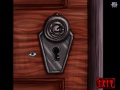
Spellbound: A Clive Mandrake Adventure

Spellbound: A Clive Mandrake Adventure

Spellbound: A Clive Mandrake Adventure

Spellbound: A Clive Mandrake Adventure

Spellbound: A Clive Mandrake Adventure

Spellbound: A Clive Mandrake Adventure

Spellbound: A Clive Mandrake Adventure


